
TL;DR: A vishing simulation tool places realistic voice phishing calls to a company's own employees so they can practise refusing and verifying an unusual request. When choosing one, check six things. The caller should hold a real conversation, not play a recording. You should control the pretext and caller number. Employees should consent first. The caller should stop when asked. Employees should learn it was a simulation. Results should show, by team, who shared and who refused, so you can fix the processes behind them.
What is a vishing simulation tool for?
A vishing simulation tool lets a security or awareness team find out what employees do when a convincing caller asks for something they should not hand over. The request is the kind an attacker really makes. Reset my password. Read me the code we sent you. Change this supplier's bank details before the payment run.
Email phishing tests cannot show you this. On the phone there is no link to hover over and no sender address to inspect. There is a voice, a reason and a deadline, and the employee has seconds to decide. Voice cloning has made that voice easier to fake, which is why more teams now want to test the phone as well as the inbox.
Most tools look alike on a product page. They differ in the call itself, in how they treat the people being called, and in what you learn afterwards. This post sets out six things to check before you choose one, and a simple way to check them in a trial. Before you test anyone, our post on the free voice phishing simulator tool lets you hear your own voice cloned in a browser.
Does the caller hold a real conversation?
This is the first question because it decides whether the test means anything. A recorded message that plays the same script to everyone is easy to spot and easy to ignore. Employees learn to recognise the recording, not the attack.
A real vishing call is a conversation. The caller answers questions, explains away doubts, and pushes again when the employee hesitates. A tool worth buying should do the same. In a trial, try to break the caller. Ask who their manager is. Say you are busy. Ask why they cannot email instead. If the call falls apart at the first unexpected answer, your employees will learn very little from it.
Listen to how it sounds too. A caller in the wrong accent, or from a foreign number, gives the game away in a way a real attacker would avoid. Check that you can choose a local caller number and a voice that fits the market you are testing. Our page on vishing simulation covers how we approach these tests.
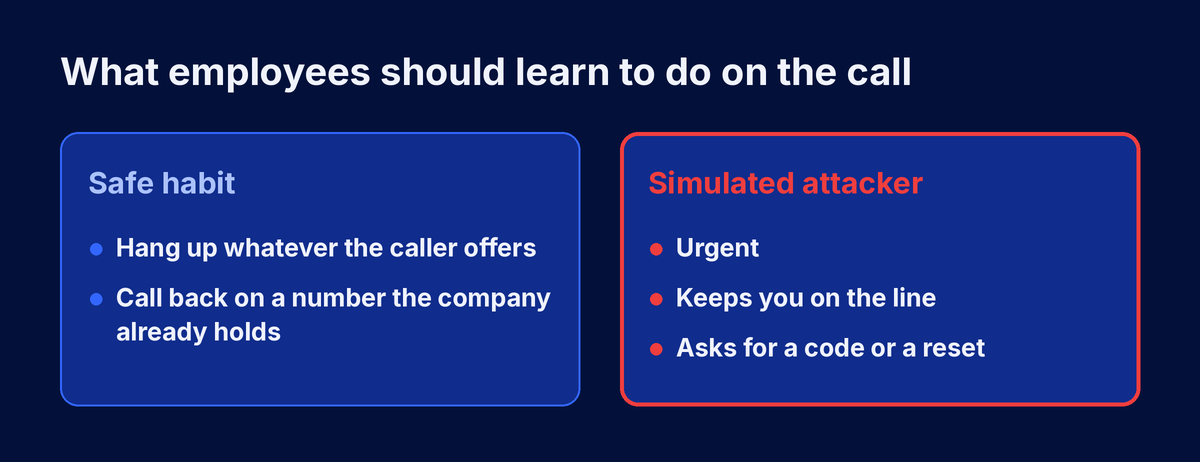
Can you choose the pretext and the target group?
The pretext is the story the caller tells. The best ones are ordinary. An IT help desk call about a locked account. A payroll query before the month end. A courier who needs a delivery confirmed. Those are the calls employees really get, so those are the calls worth practising.
Check that you can pick or write the scenario, match it to the team that would really receive it, and set how hard it pushes. A help desk scenario belongs with employees who handle resets. A supplier bank change belongs with finance. A tool that only offers one generic script for everyone tests the wrong thing for most of your employees.
Also check what the tool refuses to write. Threats, extortion and anything designed to frighten someone have no place in awareness training. A good tool blocks those scenarios before they can be saved, whoever asks.
What keeps it fair for employees?
A simulation that feels like an ambush damages trust and teaches people to fear the phone rather than to handle it well. Four checks keep it fair.
Employees consent to the programme before any call is placed. They do not know when a call will come or what it will ask, but they know the training exists and why.
The caller stops when the employee asks it to. If someone says they want to end the call or verify the request, that is the behaviour you are training for, and the call should end.
Employees learn that it was a simulation, either at the end of the call or in a follow up message, and they are shown what they could have spotted. Check how the tool handles this and make sure your campaign is set up to do it every time.
Results are used to fix processes and offer more practice, never to shame or punish. An employee who shared something on a realistic call needs another round of training, not a warning.
What should the results tell you?
Each call should end with a clear outcome. Did the employee share what was asked, or refuse? Those outcomes matter most when you read them by team rather than by person. If one department shares more often, look at its process first. A payment workflow that allows urgent changes by phone will keep producing the same result whatever the training says.
Check that you can see the outcome of every call, filter by department, and run a new round later with a different pretext to see whether the pattern changes. One round is a snapshot. Several rounds, spaced over months, show whether the habit is forming.
How to check all six in a short trial
You do not need a long evaluation to answer these questions. A short trial with a small, consenting pilot group will tell you most of what you need.
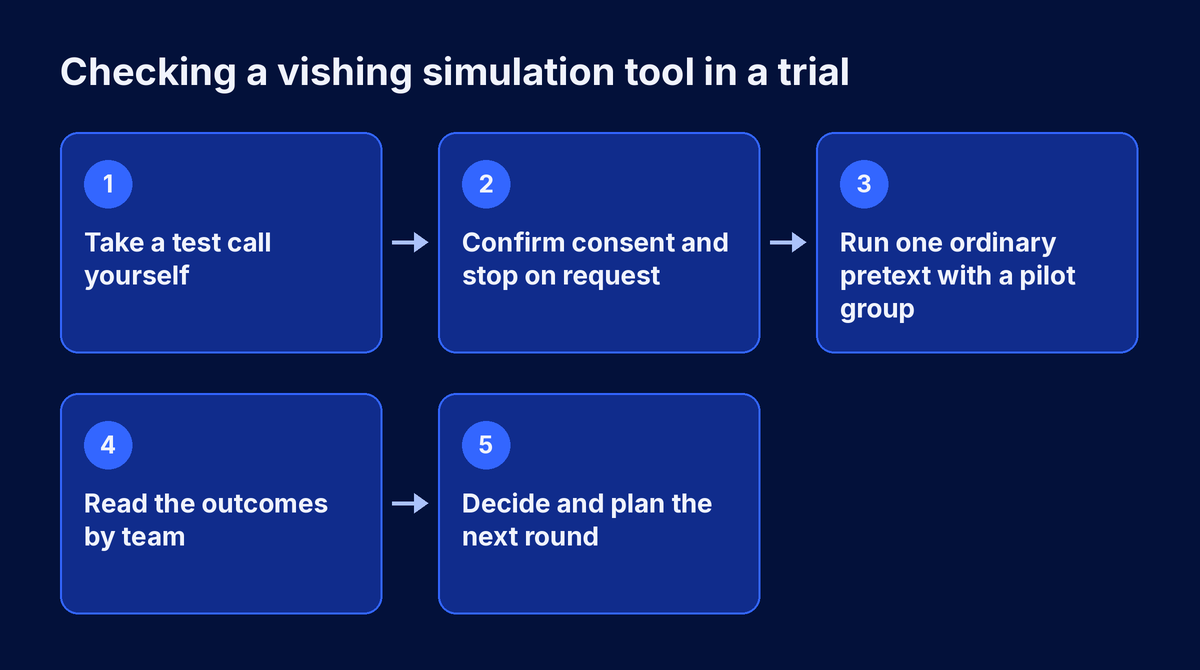
Start by taking a call yourself, then run one ordinary pretext with a pilot team that has agreed to take part. Read what happened, check that every employee learnt it was a simulation, and decide whether the results would change anything you do. If they would not, the tool is not telling you enough.
A vishing simulation tool earns its place when the call sounds like the real thing, the people being called are treated fairly, and the results point at a process you can fix. Check those three things in a short trial and the right choice is usually clear.
Frequently Asked Questions
Q: What is a vishing simulation tool?
A: A vishing simulation tool places realistic voice phishing calls to a company's own employees, with their consent, to see whether they would share information or take a risky action. It records each outcome so the security team can offer more training and fix the processes that let urgent phone requests skip a check.
Q: Should a vishing simulation use a recorded message or a live caller?
A: A live caller is far more useful. A recorded message plays the same script to everyone and is easy to spot. A live caller answers questions and pushes back when the employee hesitates, which is how real vishing calls work and what employees need to practise against.
Q: Is it ethical to run vishing simulations on employees?
A: It is when employees consent to the programme first, the caller stops when asked, scenarios avoid threats or distress, and every employee learns afterwards that it was a simulation. Results should be used to offer more practice and fix processes, never to shame or punish individuals.
Q: How often should we run a vishing simulation?
A: Run a first round as a baseline, then repeat with a different ordinary pretext every few months. Several spaced rounds show whether employees are building the habit of pausing and verifying. A single round only shows where you started and says little about whether the training is working.
Try it before you choose
Take the free deepfake security training demo yourself before you choose. Then see how voice and video simulations fit into a full deepfake security awareness training programme.
Share this article
Found it interesting? Don't hesitate to share it to your friends or colleagues